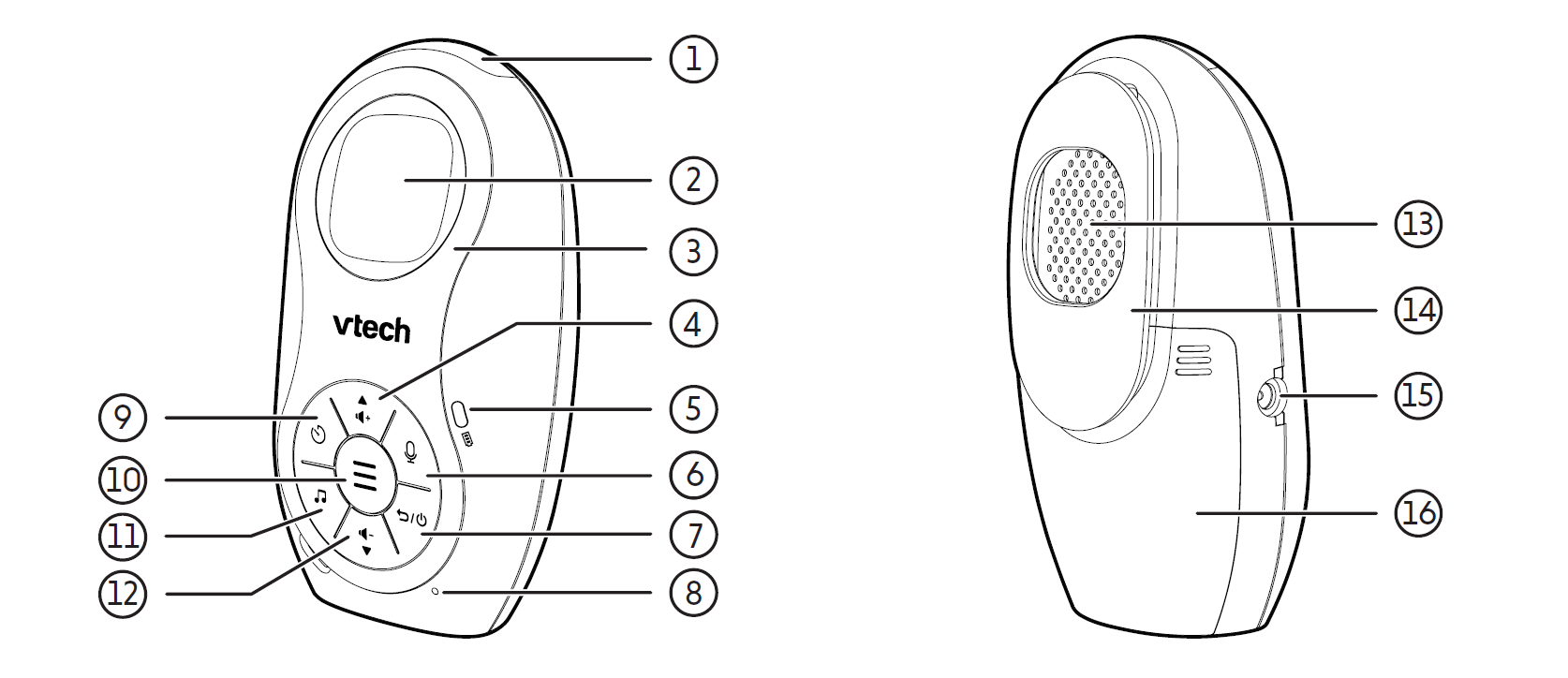
| 1 | 3- level sound indicator light • Green on when low sound level is detected by the baby unit. • Green and amber on when moderate sound level is detected by the baby unit. • Green, amber and red on when high sound level is detected by the baby unit (e.g. baby crying loudly). |
| 2 | LCD display |
| 3 | Changeable face plate |
| 4 |
• Press to increase the speaker volume (Level 1 to Level 5). |
| 5 |
• On when the parent unit’s batteries are charging. |
| 6 |
• Press and hold to talk to your baby. |
| 7 |
• Press and hold to power on. Press and hold again to power off. |
| 8 | Microphone |
| 9 |
• When in idle mode, press to set the alarm timer. |
| 10 |
• Press to enter the menu. |
| 11 |
• Press to play or stop playing the lullaby or recorded voice. |
| 12 |
• Press to decrease the speaker volume (Level 1 to Level 5). |
| 13 | Speaker |
| 14 | Belt clip |
| 15 | Power jack |
| 16 | Battery compartment cover |
 Volume Up / Up arrow
 Battery indication light
 Talkback
 Back / Power
 Alarm
Alarm Menu
Menu Lullaby
 Volume down / Down arrow