Welcome to VTech Support

Enter your model number or search for information

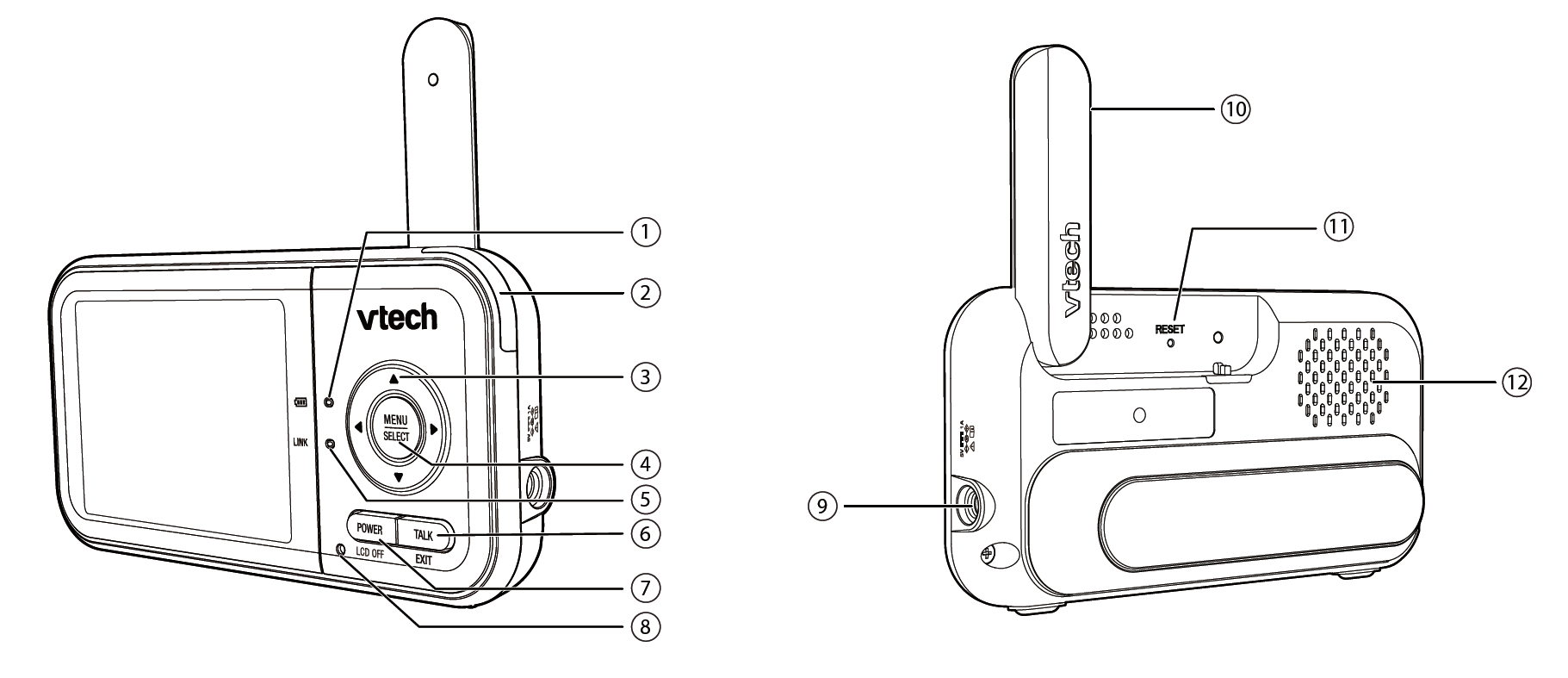
Parent Unit Overview - VM923 / VM923-2


mceclip0.png

1

Battery LED light

  • On when the parent unit battery is being charged.
  • Flashes when the parent unit battery is low and needs charging.
  • Off when the parent unit battery is fully charged.
2

3- level sound indicator light

  • Green light is on when the detects a low level of sound is detected by the baby unit.
  • Green and amber lights are on when a moderate level of sound level is detected.
  • Green, amber, and red lights are on when a high level of sound is detected.
3

up.png / VOL+

  • While in a menu, press to scroll up, or to enter an item’s sub-menu.
  • While zooming, press and hold to move the zoomed image upward.
  • Turn up the parent unit's speaker volume.

down.png / VOL-

  • While in a menu, press to scroll down.
  • While zooming, press and hold to move the zoomed image downward.
  • Turn down the volume when the speaker is on.

left.png

  • While in a menu, press to choose the next item on the left, or enter into the submenu, if any.
  • While zooming, press and hold to move the zoomed image leftward.

right.png

  • While in a menu, press to choose the next item on the right, or return to the main menu while in submenu.
  • While zooming, press and hold to move the zoomed image rightward.
4

MENU/SELECT

  • Press to enter the menu or submenu.
  • While in a sub-menu, press to choose an item, or save a setting.
5

LINK LED light

  • On when the parent unit is linked to the baby unit.
  • Flashes when the link to the baby unit is lost.
6

TALK/EXIT

  • Press and hold to talk to the baby unit.
  • When in a submenu, press to exit.
7

POWER/LCD OFF

  • Press and hold to power on.
  • Press and hold again to power off.
  • Press to turn the LCD off.
8

Microphone

9

Power jack

10

Antenna

11

RESET

  • Force reboot the parent unit.
12

Speaker

Was this article helpful?
0 out of 0 found this helpful