Welcome to VTech Support

Enter your model number or search for information
Parent Unit Overview - LM918-1W / LM918-2W


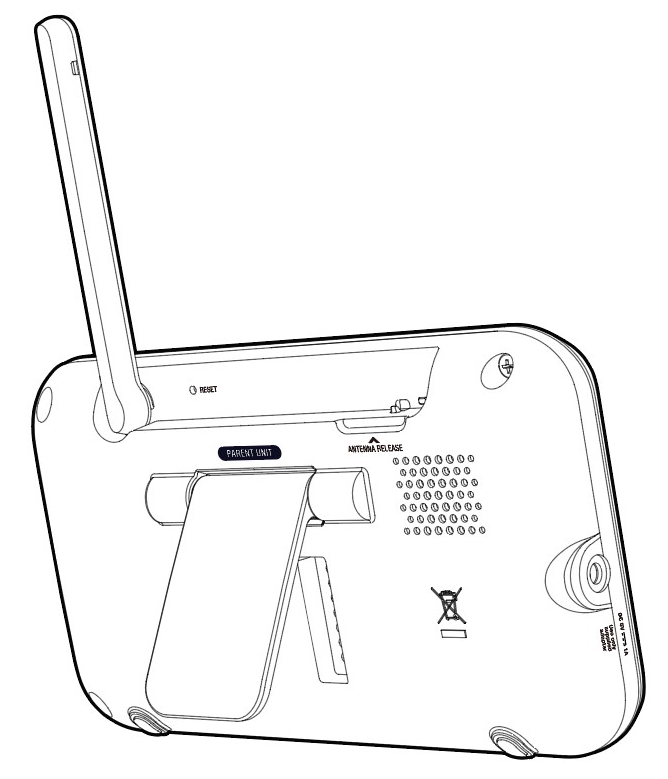
FRONT

LM-PU-overview1.png

Keys Function
LED lights
  • Indicate the different statuses of the parent unit.
LCD display  
zoom.png / EXIT
  • Press to zoom in or out while viewing image.
  • Press to return to the previous screen.
minus.jpgVolumeplus.jpg
  • Increase or decrease the volume on parent unit.
menu_icon.png
  • Press to enter the menu or submenu.
  • While in a sub-menu, press to choose an item, or save a setting.

Microphone


up.jpg


down.jpg


left.jpg


right.jpg

  •  while in a menu, press to scroll up, or to enter an item’s sub-menu.
  • Press and hold to pan or tilt the image upward.


  • While in a menu, press to scroll down.
  • Press and hold to pan or tilt the the image downward.


  • While in a menu, press to choose the next item on the left, or enter into the submenu, if any.
  • Press and hold to pan or tilt the image leftward.


  • While in a menu, press to choose the next item on the right, or return to the main menu while in submenu.
  • Press and hold to pan or tilt the image rightward. to pan or tilt the image rightward.
POWER
  • Press and hold to power on.
  • Press and hold again to power off.
TALK
  • Press and hold to talk to the selected baby unit.
VIEW /LCD ON/OFF
  • Press to change the screen to view images from different baby units.      
  • Press and hold to turn on or off the
    LCD screen.


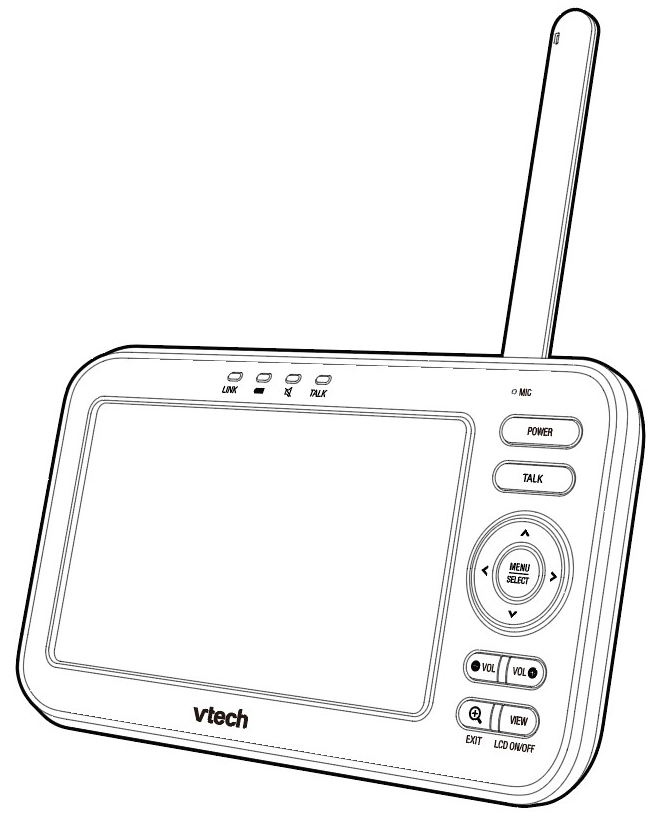
REAR

LM-PU-overview2.png

Antenna

RESET

Power jack

zoom.png / EXIT

Stand

Was this article helpful?
0 out of 0 found this helpful