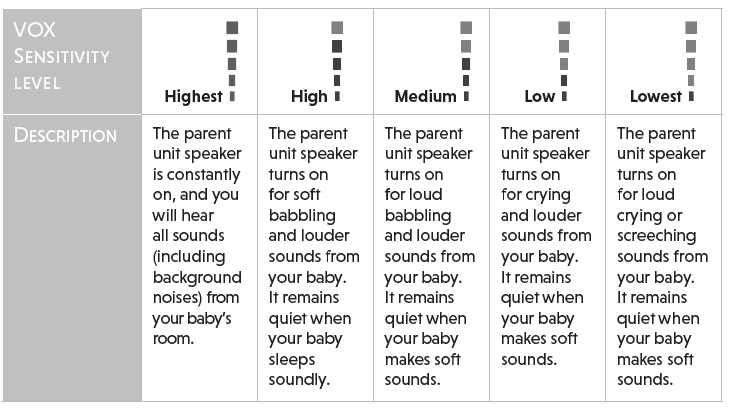
You can choose to hear sounds from the baby unit all the time, or to hear sounds that exceed a certain level. You can use the parent unit to adjust the microphone sensitivity of your baby unit. The higher the sensitivity level, the more sensitive the baby unit is in detecting sounds for transmitting to the parent unit. The VOX sensitivity level is preset to the highest level.
- Press MENU when the parent unit is idle.
- Press
 or
or  to choose VOX, then press SELECT or
  .
. - Press or
 to choose the desired sensitivity level, then press SELECT to confirm your selection.
NOTE
- As long as the Sound-activated Screen setting is on, the screen will turn on automatically when VOX sensitivity is triggered, despite it was off earlier.
TIP
- You can adjust the baby unit placement to improve the sound detection.
- If you want to use a sound machine or white noise machine for natural white noise while using this baby monitor to check on your baby, you can:
- Lower the volume of your sound machine or white noise machine; or
- Lower the sensitivity level of your baby monitor to medium or below. Default level is the
highest level.