Let VM818HD be your extra pair of eyes and ears. Set up alerts on the parent unit when a certain level of sound is detected from the baby unit. To set it up:
- Press MENU to enter the main menu.
- Press < and > to scroll to the
 Alerts Setting menu, press SELECT.
 - Select the Sound tab. Here, you can turn on or off sound related alerts, and adjust the sound detection sensitivity levels.
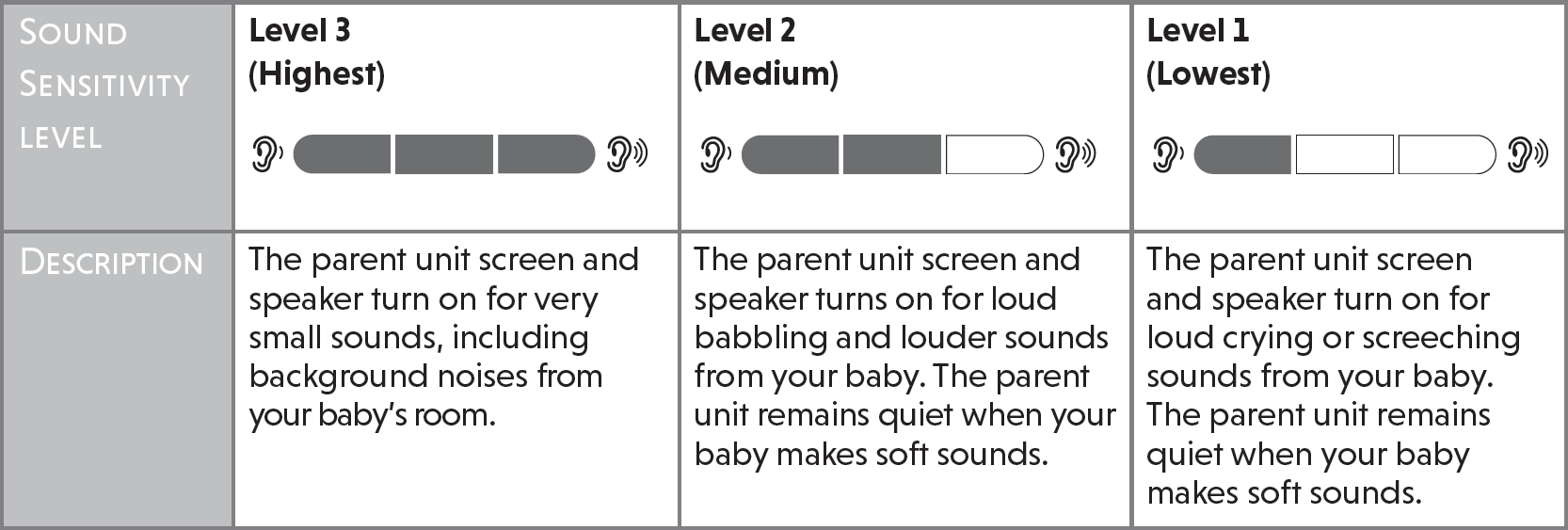
- Press ∨ to scroll to Sensitivity. Press < (decrease) and > (increase) to adjust the sound sensitivity level. To learn more about sound sensitivity, watch the video below. When the baby unit detects sounds that exceed user-set levels, the parent unit screen will turn on and the baby unit will start transmitting the detected sounds to the parent unit.
- Press ∨ to scroll to Sound Detection Alert. If you have turned on Sound Detection Alert, the parent unit beeps when the baby unit detect sounds.
- Press ∨ to scroll to Auto Wake Up. To learn more about Auto Wake Up watch the video below. The parent unit screen stays off to save power when the baby unit detects no sound. With Auto Wake Up is activated, once the baby unit detects sounds that are louder than the chosen sound sensitivity level, the parent unit screen and speaker turn on automatically. The parent unit will then turn off again after 50 seconds of no sound detection.
Notes:
• If you have muted the parent unit speaker, only the parent unit screen will turn on when a sound is detected.
• If you have turned on Auto Wake Up but turned off Sound Detection Alert, the parent unit will wake up when the baby unit detects sounds that are louder than the chosen sound sensitivity level.