Let VM818HD be your extra pair of eyes and ears. Set up alerts on the parent unit when a certain level of motion is detected by the baby unit. To set it up:
- Press MENU to enter the main menu.
- Press < and > to scroll to the
 Alerts Setting menu, press SELECT.
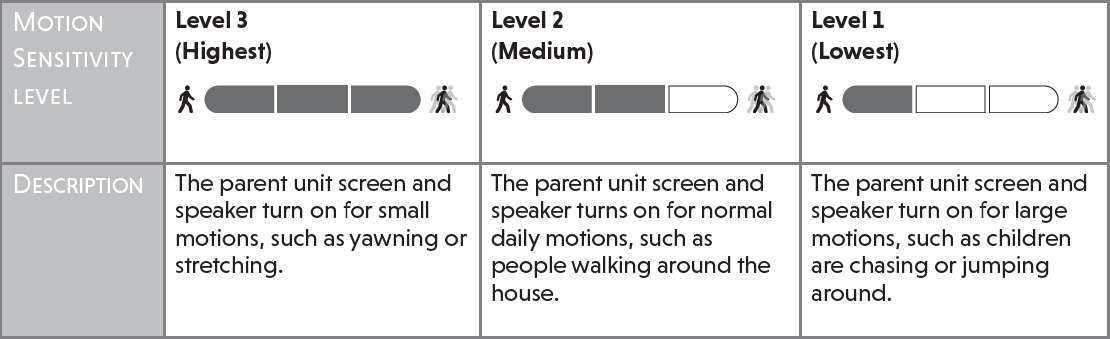
 - Press > to select the Motion alert tab. Here, you can turn on or off motion alerts, and adjust the motion detection sensitivity levels.
- Press ∨ to scroll to Motion alert. Press > to turn on the alert, and press < to turn off the alert. If you turn on Motion Detection Alert, the parent unit will beep when the baby unit detects motions.
- Press ∨ to scroll to Sensitivity. Press < (decrease) and > (increase) to adjust the motion sensitivity level. To learn more about motion sensitivity, watch the video below. When the baby unit detects movements that exceed user-set levels, the parent unit screen will turn on and the baby unit will start transmitting the detected image feed and sounds to the parent unit.
Notes:
• If you have muted the parent unit speaker, only the parent unit screen will turn on when a motion is detected.